USB C Type A Cable: Uses, Speed & Buying Guide 2026
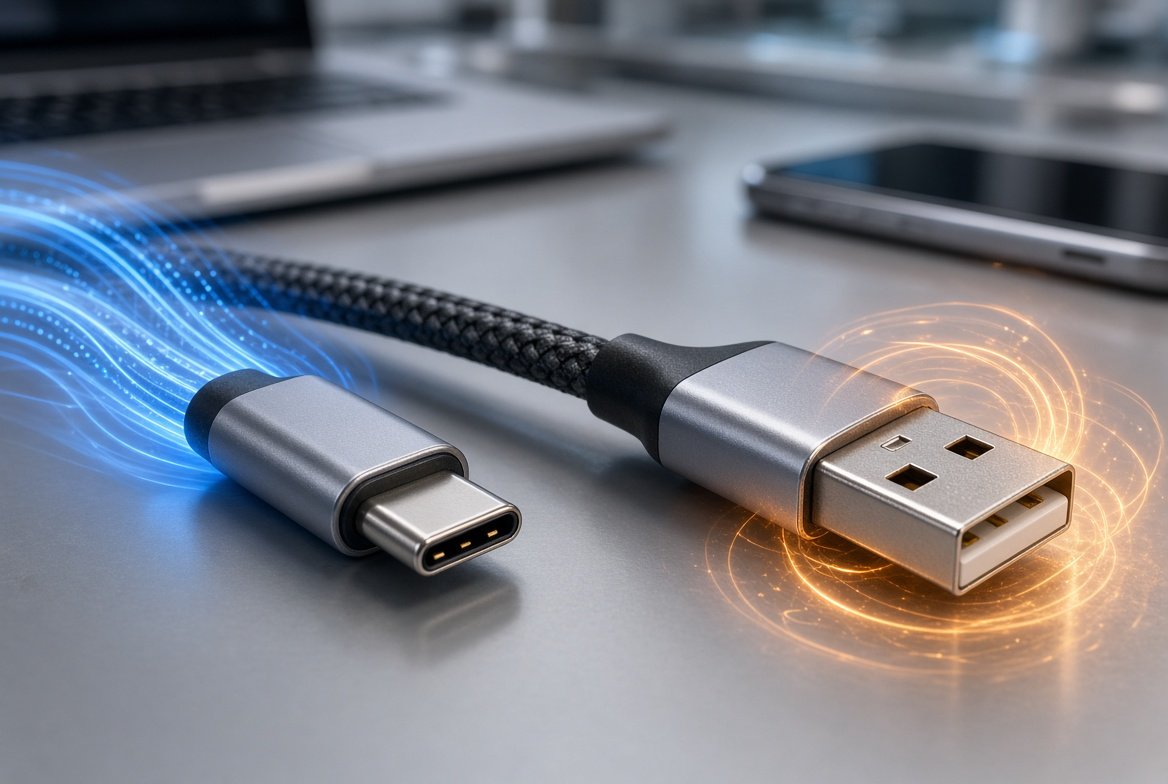
A USB C Type A cable is a cable with a USB-C connector on one end and the traditional rectangular USB-A connector on the other. It is commonly used to connect newer phones, tablets, accessories, and other USB-C devices to older computers, chargers, power adapters, and USB-A ports.
The important thing to understand is that USB-C describes the connector shape, not the cable’s maximum speed or charging capability. A USB-C-to-USB-A cable can support different data speeds and charging capabilities depending on the cable design and the devices connected to it. USB-IF specifically notes that USB cables do not all have the same capabilities.
If you need to connect a USB-C device to a computer or charger that only has a USB-A port, this type of cable can be exactly what you need.
What Is a USB C Type A Cable?
A USB C Type A cable, more formally described as a USB Type-C to USB Standard-A cable, has two different connectors:
- USB Type-C: Small, oval-shaped, reversible connector
- USB Type-A: Larger rectangular connector commonly found on older computers, chargers, TVs, cars, and other devices
For example, imagine that your smartphone has a USB-C charging port but your laptop only has a traditional USB-A port.
You can connect the phone to the laptop using a USB-C-to-USB-A cable.
The USB-C connector goes into the phone, while the USB-A connector goes into the laptop.
USB-IF’s Type-C specification specifically supports Type-C cables and connections while maintaining compatibility with legacy USB connections.
What Is a USB C Type A Cable Used For?
A USB C Type A cable can be used for several everyday tasks.
Charging USB-C Devices
One common use is charging a USB-C phone, tablet, earbuds, power bank, or another compatible device from a USB-A charger.
However, charging speed depends on the charger, cable, and device.
A USB-C connector does not automatically mean fast charging.
Transferring Data
You can also use the cable to move files between a USB-C device and a computer with a USB-A port.
For example:
USB-C phone → USB-C-to-USB-A cable → USB-A computer port
The actual transfer speed depends on the USB specifications supported by both the cable and the connected devices.
Connecting USB-C Accessories
Some USB-C accessories can be connected to computers or other equipment that still uses USB-A ports.
Examples include:
- Smartphones
- Tablets
- External storage devices
- Cameras
- Controllers
- USB-C accessories
- Some portable electronics
Always check the device manufacturer’s specifications because USB-C does not guarantee that every possible USB function is supported.
USB C Type A vs USB C Type C Cable
These two cables are easy to confuse.
USB C Type A Cable
This has:
USB-C → USB-A
It is useful when one device has USB-C and the other has a traditional USB-A port.
USB C Type C Cable
This has:
USB-C → USB-C
Both ends use the smaller, reversible USB-C connector.
USB-C-to-USB-C cables are increasingly common with newer phones, laptops, monitors, chargers, and other devices.
Which One Should You Buy?
Choose based on the ports you actually have.
| Your devices | Cable you need |
|---|---|
| USB-C phone + USB-A computer | USB-C to USB-A |
| USB-C phone + USB-C charger | USB-C to USB-C |
| USB-C accessory + USB-A computer | USB-C to USB-A |
| USB-C laptop + USB-C charger | USB-C to USB-C |
Do not buy a cable simply because the connector looks right. Check its supported power and data capabilities too.
What Speed Does a USB C Type A Cable Support?
There is no single speed for every USB-C-to-USB-A cable.
This is one of the most important things to understand before buying one.
USB-C refers to the connector system. The actual data performance depends on the USB implementation used by the cable and devices.
A cable may support USB 2.0 speeds, while another cable with a USB-C connector can support a faster USB 3.x connection.
USB-IF states that cables can have different capabilities and recommends selecting a cable with the capabilities required for the specific USB environment.
Why Connector Shape Is Not Enough
Two cables can look almost identical but perform differently.
For example:
- Cable A may be suitable mainly for charging and basic data transfer.
- Cable B may support faster USB data transfer.
- Cable C may be designed for a particular power capability.
Therefore, check the product specifications instead of assuming that every USB-C cable has the same performance.
Does USB C Type A Support Fast Charging?
It can support charging, but the cable’s connector type alone does not tell you how fast it will charge a device.
Charging performance depends on several factors:
- The power adapter
- The cable
- The device
- The charging protocol supported by the combination
A USB-A charger connected to a USB-C device may therefore charge differently from a USB-C charger connected through a USB-C-to-USB-C cable.
If fast charging is important to you, check the charging requirements of your specific phone or device and the specifications of the cable and charger.
Do not assume that a cable advertised simply as “USB-C” automatically provides the fastest possible charging.
Can You Use a USB C Type A Cable for Data Transfer?
Yes.
A USB-C-to-USB-A cable can transfer data when both connected devices support data communication through their respective ports.
For example, you can connect a USB-C smartphone to a computer’s USB-A port and transfer photos or other files.
But the speed will depend on the USB standard supported by the cable and devices.
Example
Suppose your phone supports a faster USB data mode but the cable only supports an older USB mode.
The connection can still work, but the cable can limit the available transfer performance.
This is why checking the cable specification matters when you regularly move large files.
How to Choose the Right USB C Type A Cable
Before buying a cable, check these factors.
1. Check Both Connectors
First, confirm what ports your devices have.
If one device has USB-C and the other has USB-A, a USB-C-to-USB-A cable is the correct basic cable type.
2. Check Data Speed
If you frequently transfer large files, look for the supported USB data rate rather than buying based only on the USB-C name.
A cable intended mainly for charging may not offer the data performance you expect.
3. Check Charging Requirements
If charging is your main purpose, check the power capability of the cable and the requirements of your charger and device.
4. Check Cable Length
Longer cables can be convenient, but choose a length that makes sense for your setup.
For a desk, a shorter cable can reduce clutter.
For charging from a wall adapter, you may need more length.
5. Look for Reliable Certification and Specifications
USB-IF operates a cable certification program and explains that certified cables are tested for defined capabilities.
When buying, prefer products that clearly state their supported USB data and power capabilities instead of vague claims such as “super fast” without technical specifications.
USB C Type A Cable vs USB-A to USB-C: Is There a Difference?
Usually, these phrases describe the same physical cable arrangement.
You may see products listed as:
- USB-C to USB-A cable
- USB-A to USB-C cable
- USB Type-C to USB Type-A cable
- USB C Type A cable
The important thing is to look at the actual connectors.
If one end is USB-C and the other is USB-A, it is the cable type you need for connecting those two port types.
Common Devices That Use USB-C
USB-C has become common across many categories of electronics.
You may find it on:
- Android smartphones
- iPhones and other modern mobile devices
- Tablets
- Laptops
- Cameras
- Headphones and earbuds
- Power banks
- Portable storage
- Game controllers
- Monitors
- USB hubs
However, USB-C does not mean every device supports the same features.
One USB-C port may support charging and data, while another may support additional capabilities depending on the device design.
Common Mistakes When Buying a USB C Type A Cable
Assuming Every USB-C Cable Has the Same Speed
It does not.
The connector shape alone does not tell you the cable’s complete capabilities.
Buying Only Based on Price
The cheapest cable may work perfectly for basic charging, but it may not be the right choice if you need higher data performance or specific power capabilities.
Ignoring the USB Specification
If you need fast file transfers, check the actual supported USB speed.
Confusing USB-C With Fast Charging
USB-C is a connector standard. Fast charging depends on the complete charging setup.
Buying the Wrong Connector Combination
If your laptop has USB-A and your phone has USB-C, buying a USB-C-to-USB-C cable will not solve the connection problem unless you also have a USB-C port or adapter available.
Is a USB C Type A Cable Safe?
A properly designed and compliant cable used with compatible equipment should be suitable for its intended USB application.
However, quality matters.
Avoid cables with unclear specifications, suspiciously exaggerated performance claims, or poor construction.
USB-IF’s compliance program exists to test cables against defined USB requirements, and the organization emphasizes that users should choose cables with capabilities appropriate to their particular USB setup.
For important devices, buying from a reputable manufacturer and checking the cable’s specifications is a sensible approach.
USB C Type A Cable Buying Checklist
Before placing an order, check:
- USB-C connector on one end
- USB-A connector on the other
- Required data speed
- Required charging capability
- Appropriate cable length
- Compatibility with your devices
- Clear manufacturer specifications
- Reliable seller or manufacturer
- Certification information where applicable
This quick checklist can prevent most common buying mistakes.
Frequently Asked Questions
What is a USB C Type A cable?
A USB C Type A cable is a cable with a USB-C connector on one end and a USB-A connector on the other. It allows compatible USB-C devices to connect to USB-A ports.
Is USB C Type A the same as USB-C to USB-A?
Yes. “USB-C to USB-A” is the clearer and more commonly used description for a cable with those two connector types.
Can a USB C Type A cable charge a phone?
Yes, if the phone supports charging through USB-C and the charger, cable, and phone are compatible. The charging speed depends on the complete charging setup.
Can I transfer files with a USB C Type A cable?
Yes. Compatible USB-C devices can transfer data to a device with a USB-A port. The available speed depends on the USB capabilities of the cable and devices.
Is USB C Type A faster than USB-A?
The question is not simply about the connector shape. USB-C is a connector system, while USB performance depends on the supported USB specification and implementation.
Can I use a USB C Type A cable with a laptop?
Yes, if the laptop has a compatible USB-A port and the other device uses USB-C.
Is USB C Type A better than USB C Type C?
Neither is automatically better.
USB-C-to-USB-A is useful for connecting modern USB-C devices to older USB-A ports. USB-C-to-USB-C is more appropriate when both devices have USB-C ports.
How long should a USB C Type A cable be?
Choose the shortest length that comfortably reaches between your devices. Longer cables can be useful when the power source or computer is farther away.
Does every USB-C cable support the same speed?
No. USB-IF explicitly notes that cables have different capabilities, so you should check the specifications of the specific cable you are buying.
Final Verdict
A USB C Type A cable is a practical solution when you need to connect a modern USB-C device to a traditional USB-A port.
It can be used for charging and data transfer, but the exact performance depends on the cable and the connected devices.
The biggest mistake is assuming that every USB-C cable has the same capabilities.
Before buying, check the connector types, USB data speed, charging requirements, cable length, and manufacturer specifications.
If you only need to connect a USB-C phone to an older laptop or USB-A charger, a good USB-C-to-USB-A cable can be all you need.
If you need maximum charging or data performance, however, compare the complete specifications rather than choosing a cable based only on the USB-C connector.


Post Comment