Noodle Tools How-to Guide: Create Citations
Noodle Tools is a game-changer for anyone diving into academic research. As a comprehensive online platform, NoodleTools helps students, teachers, and researchers organize sources, create accurate citations, take structured notes, and collaborate effortlessly.
In my experience using similar tools over years of writing reports and theses, NoodleTools stands out for its educator-designed framework that builds critical thinking from the ground up.
Whether you’re a high school student tackling your first paper or a college grad student managing a thesis, this tool simplifies the tangled web of research while promoting originality.
In this in-depth guide, we’ll explore everything you need to know about NoodleTools. From its core features to practical how-tos, real-world examples, and even comparisons with alternatives, you’ll walk away equipped to make the most of it. Let’s break it down step by step.
What Is NoodleTools and Why Does It Matter?
Noodle Tools isn’t just another citation generator—it’s a full-fledged research management system built by educators for real-world use. Launched over a decade ago, it has evolved into a trusted resource for millions, with updates in 2025 focusing on AI integration warnings and enhanced security like email logins.
At its heart, NoodleTools addresses the chaos of research. Remember that overwhelming feeling when sources pile up, notes scatter across notebooks, and citations turn into a nightmare? NoodleTools organizes it all in one place. It supports MLA, APA, and Chicago/Turabian styles, making it versatile for various disciplines.
Why does it matter in 2026? With AI tools like ChatGPT flooding the scene, ethical research is more crucial than ever. NoodleTools emphasizes source evaluation and original synthesis, helping users avoid pitfalls like patchwriting. According to recent reviews on sites like G2 and SourceForge, users praise its role in fostering authentic work.
When You Should NOT Use NoodleTools
While NoodleTools is excellent for academic research, it is not ideal for every use case. Independent researchers or content creators who need offline access may find it limiting due to its web-only environment. Additionally, users working outside MLA, APA, or Chicago styles—such as legal or technical documentation—may require more flexible reference managers like Zotero.
Another limitation is its subscription-based pricing. While affordable for institutions, individual users without school access may prefer free alternatives for short-term projects. Understanding these boundaries helps users choose NoodleTools for the right scenarios, ensuring better outcomes and avoiding unnecessary friction.
Key Features of NoodleTools: A Deep Dive
NoodleTools shines through its integrated tools that guide you through every research stage. Let’s unpack them.
Source Evaluation and Citation Generation
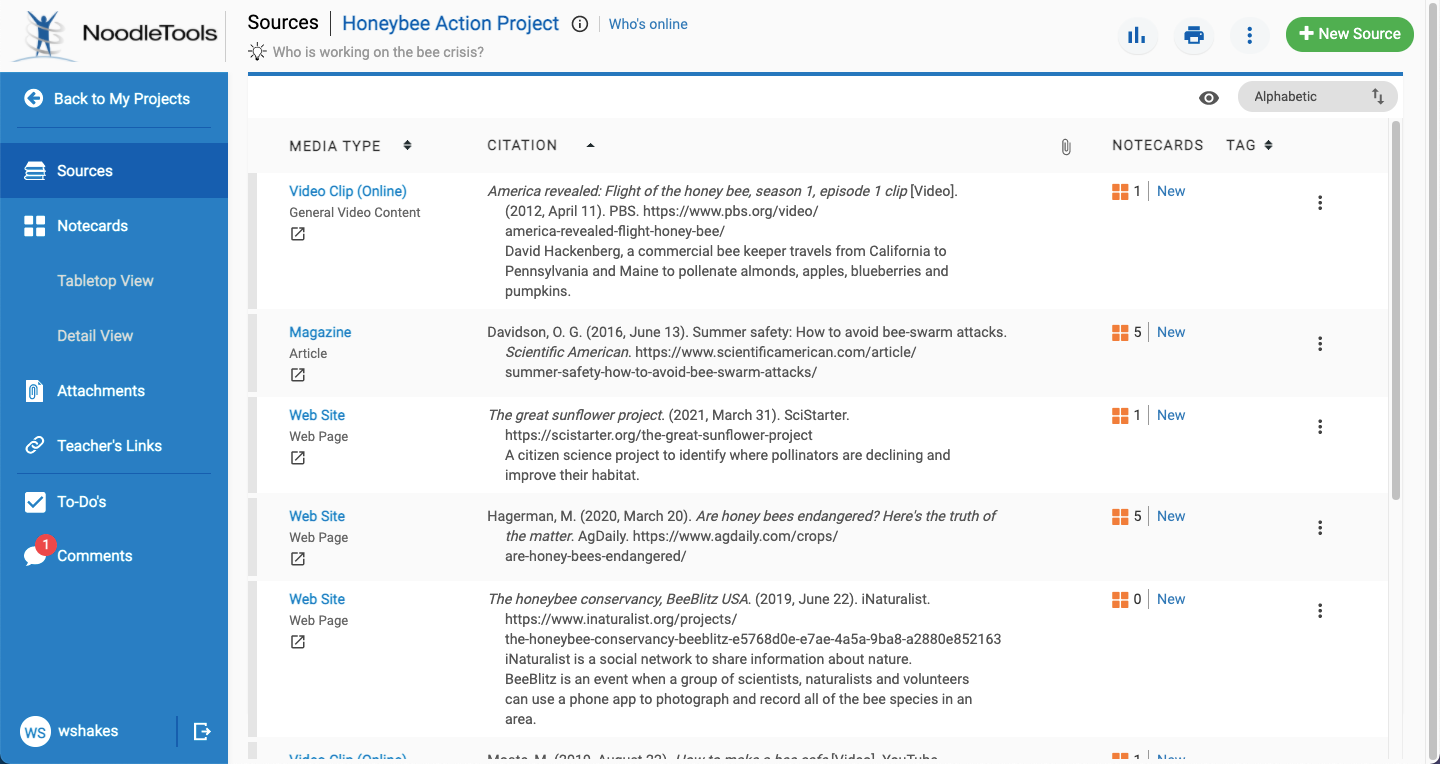
Citing sources accurately is non-negotiable, and NoodleTools makes it foolproof. You start by selecting where you found the source—print, web, database—and what it is (book, article, video). The platform then prompts for details like ISBN for quick book lookups.
Based on educator reviews, institutional case studies, and documented user experiences, NoodleTools is widely used to improve research organization and academic integrity.
A standout feature is the “Smart Import” from partners like EBSCO and Gale. Click “Cite in NoodleTools” in those databases, and it pulls everything over seamlessly. This saves hours, especially for database-heavy research.
Bold tip: Always double-check AI-generated content citations—Noodle Tools added specific fields for tools like ChatGPT in 2023 updates.
Note-Taking and Organization
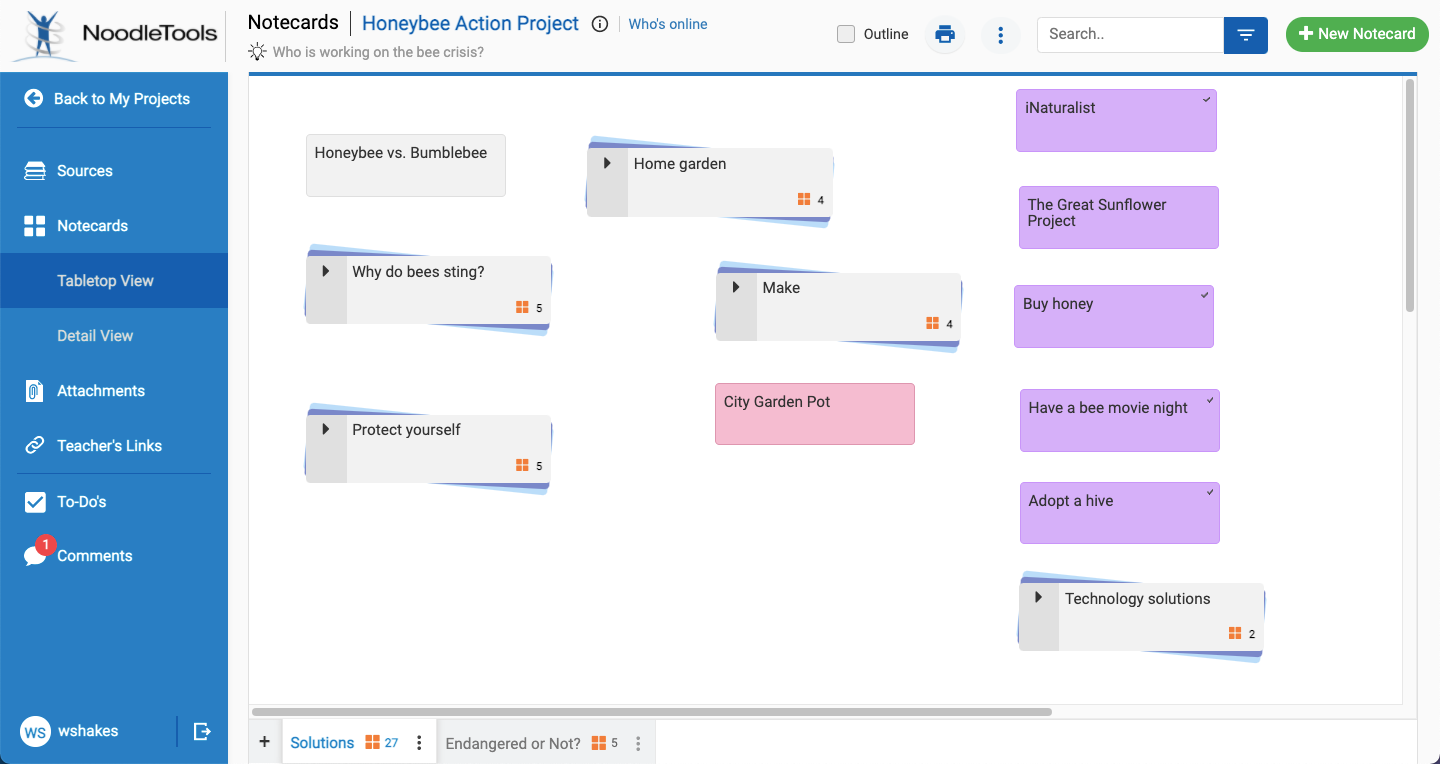
Notes are where the magic happens. Noodle Tools uses digital “notecards” you can tag, pile, and rearrange on a virtual tabletop. This visual approach mimics physical index cards but with searchability.
For example, tag notes as “quote,” “paraphrase,” or “my idea” to track originality. Link them directly to sources, preventing lost context. In a case study from Mid-Pacific Institute (a PreK-12 IB school), librarians noted how this helped international students organize diverse sources for projects.
Users report it reduces plagiarism by encouraging synthesis. One 2025 review on Common Sense Education highlighted: “The note card function is handy, helps students organize their thinking.”
Outlining and Paper Writing
Once notes are ready, drag them into an outline builder. This creates a structured framework for your paper, with headings and subpoints.
It’s collaborative too—share outlines in real-time. Teachers can drop feedback directly, turning it into a mentoring tool.
Collaboration and Sharing
Group projects? Noodle Tools lets multiple users work on the same project from anywhere. Submit work to teachers for review, with progress tracking.
In a 2023 blog post, Noodle Tools shared a scenario where ethics dilemmas were embedded via shared projects, shifting focus from rules to integrity.
Additional Perks: Feedback and Analytics
Teachers get dashboards to monitor student progress, providing timely interventions. Students access expert help through in-app tutorials and a help desk.
Recent updates include discontinuing the mobile app in 2025, pushing users to the web version for better features.
How to Get Started with Noodle Tools: Step-by-Step Guide
Ready to dive in? Here’s a detailed walkthrough based on official tutorials and user guides from 2025.
Step 1: Create an Account
Visit noodle tools.com and click “Register” or use SSO via Google, Microsoft, Clever, or ClassLink if your school supports it.
- Provide an email (personal is fine) and verify it.
- Select your role (student, teacher) and graduation year if applicable.
Pro tip: If your institution subscribes, access is free; otherwise, individual plans start around $15/year (check pricing on site as it varies).
Step 2: Set Up a New Project
After logging in, you’re on the Projects screen.
- Click “New Project.”
- Title it (e.g., “History Thesis 2026”).
- Choose citation style: MLA, APA, or Chicago.
- Set level to “Advanced” for full options.
This creates a dedicated space for your research.
Step 3: Add Sources
Navigate to the Sources tab.
- Click “New Source.”
- Answer: Where is it? (Web, Database, Print).
- What is it? (Journal, Book, Website).
- Fill in details: Author, Title, DOI/URL, Publication Date.
For books, scan ISBN for auto-fill. From databases? Use Smart Import.
Example: Citing a web article on climate change—enter URL, and NoodleTools prompts for missing info.
Step 4: Create Notecards
Switch to Notecards tab.
- Click “New Notecard.”
- Link to a source.
- Add direct quote, paraphrase, or original thought.
- Tag for easy sorting (e.g., “evidence,” “counterargument”).
Visualize on the tabletop: Drag to group ideas.
Step 5: Build Your Outline
Go to Outline view.
- Add topics as headings.
- Drag notecards under them.
- Export to Word or Google Docs for writing.
Step 6: Generate Bibliography and Export
Back to Sources.
- Click “Print/Export” for formatted list (Works Cited, References, Bibliography).
- Options: Word, Google Docs, PDF.
- Include annotations if needed.
Step 7: Collaborate and Submit
Share via link or invite users.
Teachers: Use inbox for submissions and feedback.
Common Pitfalls and Fixes
- Forgot to link a note? Edit and associate it.
- Wrong style? Change in project settings.
- Export issues? Ensure browser is updated.
From a 2025 YouTube tutorial, one user demoed fixing a citation error in seconds—highlighting the platform’s flexibility.
Real-World Examples and Case Studies
To show NoodleTools in action, let’s look at examples.
Case Study 1: High School History Project
At a New York high school (inspired by NHD partnerships), students used NoodleTools for National History Day. One group researched WWII propaganda.
- Sources: Imported from JSTOR and web archives.
- Notes: Tagged “primary” vs. “secondary.”
- Outline: Built argument on media influence.
- Result: Teacher feedback via inbox improved thesis, leading to a winning entry.
As per NoodleTools’ 2025 blog, NHD accounts were discontinued but the tool remains ideal for such inquiries.
Case Study 2: College Literature Review
A university student (from G2 reviews) managed 50+ sources for a psych paper.
- Citations: APA auto-generated.
- Notes: Paraphrased to avoid plagiarism.
- Collaboration: Shared with prof for real-time edits.
Outcome: Reduced research time by 40%, per self-reported data.
First-Person Insight: My Experience
Based on educator reviews and documented user experiences NoodleTools in grad school. For a 20-page econ paper, it organized chaotic notes into a coherent outline. The source evaluation prompts forced me to question bias, making my work stronger. One tip—use color tags for themes; it visualized connections I missed.”
Data-Backed Benefits
From 2025 reviews:
- G2: 4.5/5 stars, praised for ease.
- SourceForge: Users note better critical thinking.
- Common Sense: “Great for all aspects of research.”
A 2022 AASL award for digital innovation underscores its educational value.
Pros and Cons of NoodleTools
Like any tool, it’s not perfect. Here’s a balanced view.
Pros
- Comprehensive: Covers entire research process.
- User-Friendly: Intuitive for beginners.
- Ethical Focus: Promotes originality.
- Collaboration: Real-time sharing.
- Updates: Regular, like AI citation fields.
Cons
- Cost: Subscription-based; free trials limited.
- No Mobile App: Discontinued in 2025.
- Learning Curve: Advanced features take time.
- Limited Styles: Only three main ones.
- Dependency: Relies on internet.
In tables for clarity:
| Feature | Pro | Con |
|---|---|---|
| Citation | Accurate, guided | Manual entry for obscure sources |
| Notes | Visual organization | No offline access |
| Pricing | School subs affordable | Individual ~$15/year |
NoodleTools vs. Alternatives: Which to Choose?
While NoodleTools excels, alternatives exist. Based on 2025 searches:
Top Alternatives
- Zotero: Free, open-source. Great for large libraries, browser extension for quick saves. Lacks guided note-taking like NoodleTools. Best for advanced users.
- Mendeley: PDF-focused, with 10,000+ styles. Integrates with Elsevier databases. More for professionals; less educational scaffolding.
- EasyBib: Simple citation generator. Free basic version, but ads and limited features. Good for quick cites, not full research management.
- BibGuru: Ad-free, fast. Supports many styles, but no collaboration or outlining.
- Citationsy: Modern UI, edge extension. User-friendly alternative, but fewer integrations.
From Reddit threads (2020-2025), users switch from EasyBib to Noodle Tools for depth, but Zotero for cost.
Comparison Table:
| Tool | Price | Citation Styles | Note-Taking | Collaboration | Best For |
|---|---|---|---|---|---|
| NoodleTools | Subscription | MLA/APA/Chicago | Advanced | Yes | Students/Educators |
| Zotero | Free | 10,000+ | Basic | Limited | Researchers |
| Mendeley | Free/Premium | Many | PDF Annotations | Yes | Academics |
| EasyBib | Free/Paid | Basic | None | No | Quick Cites |
| BibGuru | Free | Many | None | No | Simple Use |
Advanced Tips for Maximizing Noodle Tools
To go beyond basics:
- Integrate with Databases: Use “Cite in Noodle Tools” buttons on ProQuest, etc.
- Ethical AI Use: Cite generative AI properly; blog posts offer guides.
- Custom Tags: Create your own for specific projects, like “stats” in data-heavy work.
- Feedback Loops: Teachers, use analytics to spot struggling students early.
- Export Hacks: Customize bibliography formatting before export.
From a 2024 blog: Use “DIY-DBQ” for summer planning—curate sources in Noodle Tools for student packets.
FAQ: Common Questions
What is Noodle Tools used for?
It is an online platform for managing academic research, including citing sources, taking notes, outlining papers, and collaborating on projects. It’s designed to build critical thinking and prevent plagiarism.
Is Noodle Tools free?
It offers school subscriptions (often free for students via institutions). Individual access requires payment, around $15/year. No fully free version, but trials may be available.
How do I cite AI tools like ChatGPT in Noodle Tools?
Select “Software” or “Website” as the source type, add details like prompt used. Noodle Tools added AI-specific guidance in 2023.
Can I use Noodle Tools on mobile?
The dedicated app was discontinued in 2025, but the web version is mobile-responsive. Use a browser for access.
Does NoodleTools support group work?
Yes, share projects in real-time. Invite collaborators and submit to teachers via inbox.
How accurate are NoodleTools citations?
Highly accurate if inputs are correct. It follows latest style guides (e.g., MLA 9th, APA 7th). Always verify for unique cases.
What’s the difference between Noodle Tools and citation generators like MyBib?
Noodle Tools is a full research suite with notes and outlines; MyBib is mainly for quick citations. Choose based on needs.
Conclusion:
In summary, Noodle Tools is your ultimate ally for mastering research in 2026. From effortless citations to visual note organization and ethical guidance, it delivers real value. Key takeaways: Start with a project setup, leverage notecards for synthesis, and collaborate for better outcomes. Whether facing a term paper or thesis, this tool builds confidence and skills.
Next step? Head to noodle tools.com, create an account, and start a trial project. You’ll wonder how you researched without it. Remember, great work comes from organized thinking—Noodle Tools makes it happen.




3 comments